
Apache Junction Residents Directory Lookup
Finding Apache Junction residents through public records takes some know-how. The city sits at the base of the Superstition Mountains in Pinal County. About 44,000 people call Apache Junction home. Searching the residents directory here means using city, county, and state resources. The city clerk handles general public record requests. Municipal Court keeps case files on local matters. Law enforcement records go through the police department. Property data and voter rolls come from Pinal County offices. This page walks you through each source so you can find the information you need fast.
Apache Junction Quick Facts
Apache Junction City Clerk Records
The Apache Junction City Clerk is your first stop for many public records. This office handles requests for city documents. Meeting minutes, contracts, permits, and other city files go through here. The clerk follows Arizona public records law for all requests.
You can submit a public records request at apachejunctionaz.gov/972/Public-Record-Request. The page explains the process step by step. Fill out the online form with your request details. Be specific about what you want. The more detail you give, the faster staff can find it. You can also mail or fax your request if you prefer paper. The city uses Legistar and American Legal Publishing systems to manage records.
The Apache Junction Public Records Request page shows how to submit requests for city documents.
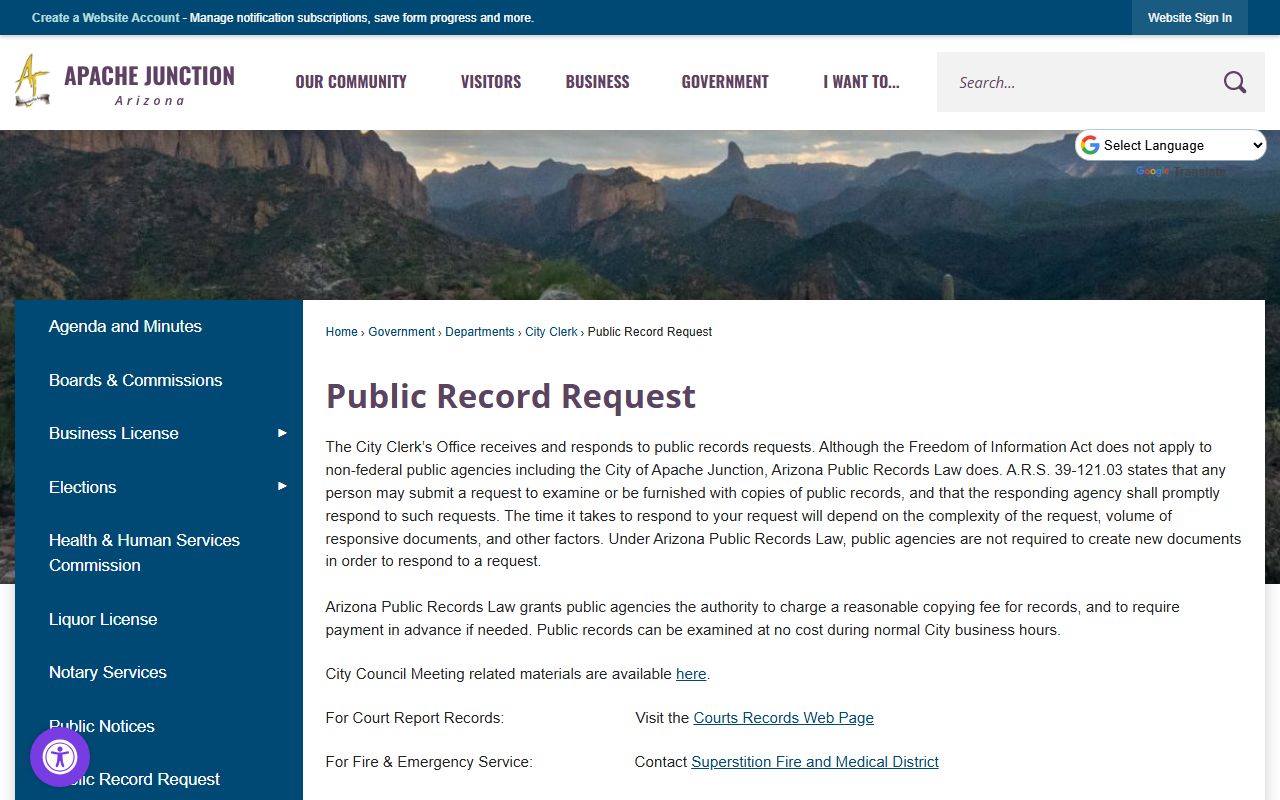
The online portal lets you track your request status after you submit it.
Fees for Apache Junction clerk records start at $17.00 per case minimum. Copies cost $0.50 per page after that. Complex requests may have extra charges for research time. The city will tell you the total before they start work on big requests. You can pay by check or money order. Some offices take cards too. Ask when you submit.
Note: Response times vary based on the size and type of request you make.
Apache Junction Legistar Meeting Records
Apache Junction uses Legistar for meeting agendas and minutes. This system tracks city council sessions, board meetings, and commission hearings. It is a key tool for the Apache Junction residents directory. You can find out who spoke at meetings and what actions the city took.
Access the Legistar portal at apachejunction.legistar.com/Calendar.aspx. The calendar view shows upcoming and past meetings. Click any meeting to see its agenda. You can download packets with full details. The system keeps records going back several years.
The Apache Junction Legistar portal provides access to city council and board meeting records.
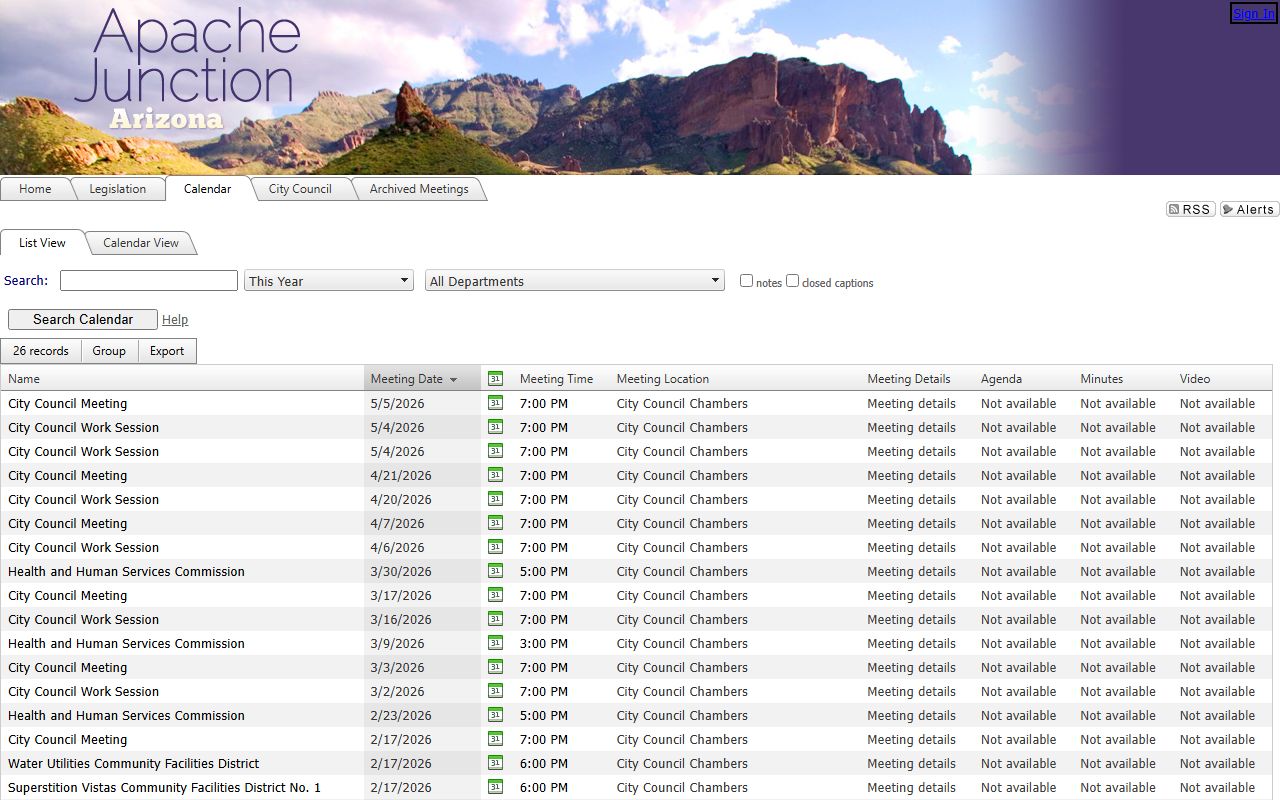
Search by date or keyword to find specific meetings and agenda items.
Meeting records show a lot. You can see who attended. Votes are recorded. Public comments appear in the minutes. This helps track how local leaders make decisions. Names of Apache Junction residents who participate in public meetings are part of these records. Business owners, committee members, and concerned citizens all appear in Legistar files.
Apache Junction Municipal Court Records
Apache Junction Municipal Court handles local cases. Traffic tickets, city code violations, and misdemeanors go here. Court records help find Apache Junction residents with legal matters in the city. These files are public under Arizona law with some limits.
Request court records at apachejunctionaz.gov/1022/Records. The page lists what records are available and how to ask for them. You can search for cases by name or case number. Staff can help you find what you need if you call or visit in person.
Copies of court records cost money. Standard copies run $0.50 per page. Certified copies cost more. The minimum clerk fee of $17.00 applies to case file requests. Contact the court for exact totals on your request. Processing takes a few days for simple requests. Complex matters need more time.
Some court records have limits. Juvenile cases stay sealed. Cases that were dismissed or expunged may not be available. Protective orders have special rules. Most adult criminal and traffic cases are open though. Arizona law sets the rules on what can be released.
Apache Junction Police Records
The Apache Junction Police Department keeps arrest records, incident reports, and crash data. These records tie to the Apache Junction residents directory when someone has had contact with law enforcement. Records requests go through the police department directly.
You can call the Apache Junction Police at (480) 474-5445 to ask about records. Tell them what you need and they will explain the process. Some records are available right away. Others need a formal request in writing. The department follows Arizona public records law on what they can release.
Police records that may be public include:
- Arrest reports for adults
- Incident reports after cases close
- Crash and accident reports
- Calls for service logs
- Booking photos in some cases
Not all records are public. Ongoing investigations stay closed. Juvenile files are sealed. Victim information may be redacted. The police will tell you what they can provide and what is restricted.
Fees vary by record type. Crash reports may go through the state BuyCrash system. That costs a few dollars per report. Other records have copy fees. Ask about costs when you make your request. The department can give you a total before they start work.
Note: Sealed and expunged records are not available to the public under any circumstances.
Pinal County Records for Apache Junction
Apache Junction is in Pinal County. Many resident records come from county offices. Property deeds go through the County Recorder. Tax data is with the Assessor. Voter rolls come from the Elections office. Superior Court handles felonies and major civil cases. Justice Court covers smaller matters in the Apache Junction area.
The Pinal County Recorder keeps property records. These show who owns land and homes in Apache Junction. You can search deeds, liens, and mortgages online. The site lets you look up records by owner name or property address. This is a key source for the Apache Junction residents directory when you need property information.
Voter registration goes through Pinal County too. Residents who register to vote appear in county rolls. Public fields include name, address, and party affiliation. Some data is restricted by state law. Contact the county elections office for voter list requests. They can tell you what information is available and what it costs.
For serious court cases, check Pinal County Superior Court. Felonies, major civil suits, and family law cases are heard there. The online docket lets you search by name or case number. Apache Junction residents with cases above the municipal level appear in this system. Justice Courts handle smaller claims and misdemeanors based on location.
Search Apache Junction Residents Step by Step
Looking for someone in Apache Junction takes a plan. Start by figuring out what record type you need. Then pick the right office or database. Each source has its own tools and rules. Some are free. Others charge fees.
Here is a basic approach. For city records like meeting minutes or permits, use the city clerk portal. For court matters within city limits, check Municipal Court. Police records go through the police department. Property and voter data require Pinal County websites. State databases cover items like professional licenses and corporation records.
Common searches for Apache Junction residents include:
- Property ownership through Pinal County Assessor and Recorder
- Court cases at Municipal Court or Pinal County courts
- Meeting participation on Legistar
- Police reports through the department
- Voter registration at county elections
Online searches work best for speed. Most systems let you search by name. Some need an address or case number. Be patient if your first search comes up empty. Try different spelling or check a different source.
When online tools fail, try calling. Staff at city and county offices can point you to the right place. They know their systems better than anyone. A quick phone call can save hours of searching. The city clerk and court clerk are good first contacts for Apache Junction records.
Apache Junction Records Fees
Fees for Apache Junction public records depend on the source. City fees are different from county fees. Court fees have their own schedule. Knowing costs upfront helps you budget your search.
Apache Junction city fees start at $17.00 minimum per case. After that base, copies cost $0.50 per page. The minimum applies to most clerk and court requests. Large requests may have extra charges for staff research time. The office will tell you the total before starting work on complex requests.
Pinal County fees are separate. The Recorder charges for certified copies of deeds. The Assessor provides free online searches but may charge for printed records. Court filing lookups are often free online. Getting copies costs money though. Check each county office for their current fee schedule.
Processing times follow Arizona law. Simple requests should be done in a few business days. Large or complex requests take longer. The law says agencies must respond promptly. They can take reasonable time for big jobs. Staff will update you on timing if your request needs extra work.
Nearby Arizona Cities
These cities are close to Apache Junction. Records for residents near city borders may appear in multiple jurisdictions. Check neighboring areas if your search comes up short.
Pinal County Resources
Apache Junction is in Pinal County. Visit the county page for more record sources. You will find information on the Recorder, Assessor, Superior Court, and Sheriff offices there. Many Apache Junction resident records are held at the county level, so check both city and county sources for the most complete search.